

Testing
Truemed’s sandbox (dev) environment mirrors production, so you can run the entire payment flow end to
end—create a session, complete checkout, and receive the payment_session_complete webhook—without
moving real funds. The flow is identical to production; only the credentials and base URL differ.
Set up the sandbox
A sandbox key only works against the dev base URL. See Before You Begin for the full setup.
Place a test payment
-
Create a payment session against the dev base URL, exactly as in Accept Your First Payment.
-
Open the
redirect_urlfrom the response (or render it inline with Embedded Checkout) and complete the health survey as the customer would. -
Enter the test card—no real funds move:
- Card number: 4242 4242 4242 4242
- Expiration: any future date
- CVC / ZIP: any values
Drive the outcome you want to test
A freshly completed test payment lands in processing. To move it to a terminal status, open the
Payments tab of the Truemed dev dashboard and use the Actions menu
on the test payment:
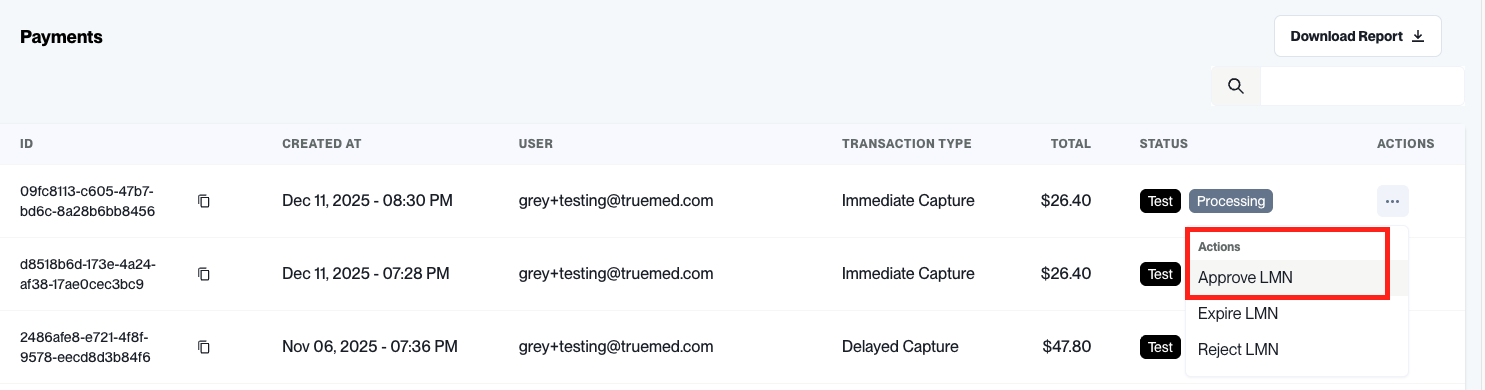
Approving the LMN moves an immediate-capture session from processing to captured. For a
manual capture session it moves to authorized—
then capture or void it through the API. Approve and Reject appear only while the LMN
verification is still pending. See Payment Lifecycle
for what each status means, and Subscriptions for the expired-LMN
flow.
Verify the result
- Confirm your endpoint received
payment_session_completewith the expectedstatus. - Or retrieve the session directly:
GET /payments/v1/payment_session/{business_id}. - Check that
authorize_amountandcapture_amountmatch what you expect.
Before you go live
- Swap the sandbox key for a production key, and the dev base URL for
https://api.truemed.com/payments/v1/. - Recreate your webhook in the production dashboard and subscribe it to
payment_session_complete. - Walk through the Implementation Readiness Checklist.